
A WhatsApp shared inbox your team can actually be held to
A shared inbox is not more people holding the same phone. It is one queue where every conversation has an owner, a history and a clock. This page shows exactly how that works in marv.Inbox, what it takes to set up, and where the honest limits are.
- One assigned owner and one team per conversation, so nothing is answered twice or not at all
- Internal notes inside the conversation that the customer never sees
- SLA policies with first response, next response and resolution targets
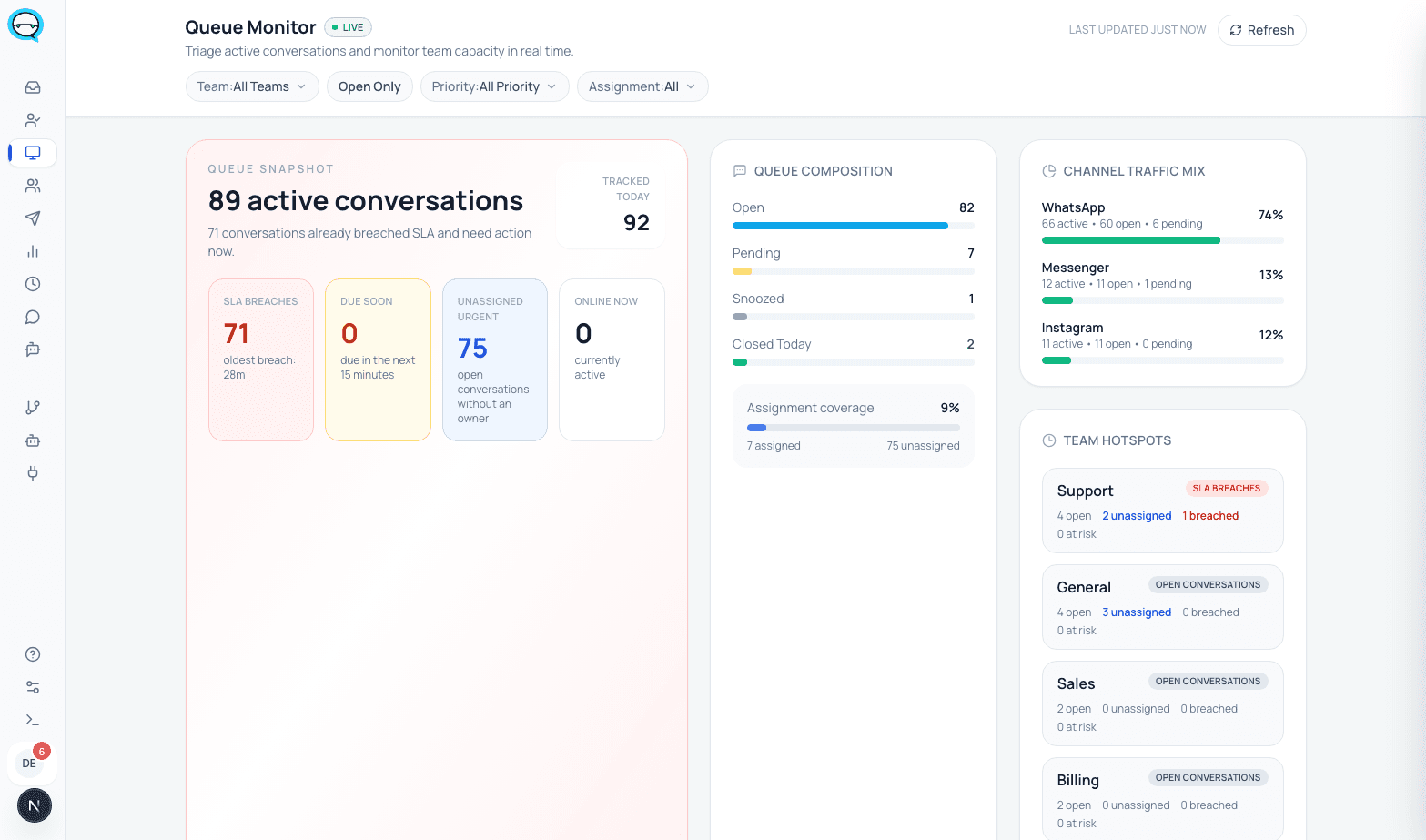
- A live queue monitor showing open load, unassigned work and what is running late
Short answer
A WhatsApp shared inbox connects your business number to software your whole team signs into, instead of to a phone they pass around. Each conversation gets one assigned owner, a status and a full history, so a second agent opening it can see who is on it and what has already been said.
It is worth it when more than one person covers the same queue. If everyone has their own customers and nobody overlaps, the WhatsApp Business app and its four linked devices are enough, and you should not pay for this.
Sharing an account is not the same as a shared inbox
Sharing the WhatsApp Business account means linking more devices to one phone. WhatsApp supports up to four linked devices and one phone at a time, and a Meta Verified or Meta One subscription raises that to ten with chat assignment inside the app. Everyone in that account sees the same chat list.
What account sharing does not produce is a record. There is no owner field, no status, no note that stays internal, no queue to report on, and no way to tell later who handled a customer. Access is tied to devices, so removing somebody means unlinking a device on the primary phone.
A shared inbox puts the conversation, not the device, at the center. The number connects once, people sign in with their own accounts, and every conversation carries an owner, a team, a status, a priority and tags that the whole team reads the same way.
If you are still deciding between the two, the neutral comparison is on our guide to whether multiple users can use WhatsApp Business, which covers all four routes including the ones that do not involve us.
What happens to a message, start to finish
This is the actual path a WhatsApp conversation takes through marv.Inbox. Every step below maps to a field or a surface in the product, not to a diagram.
- 01
It arrives in one queue
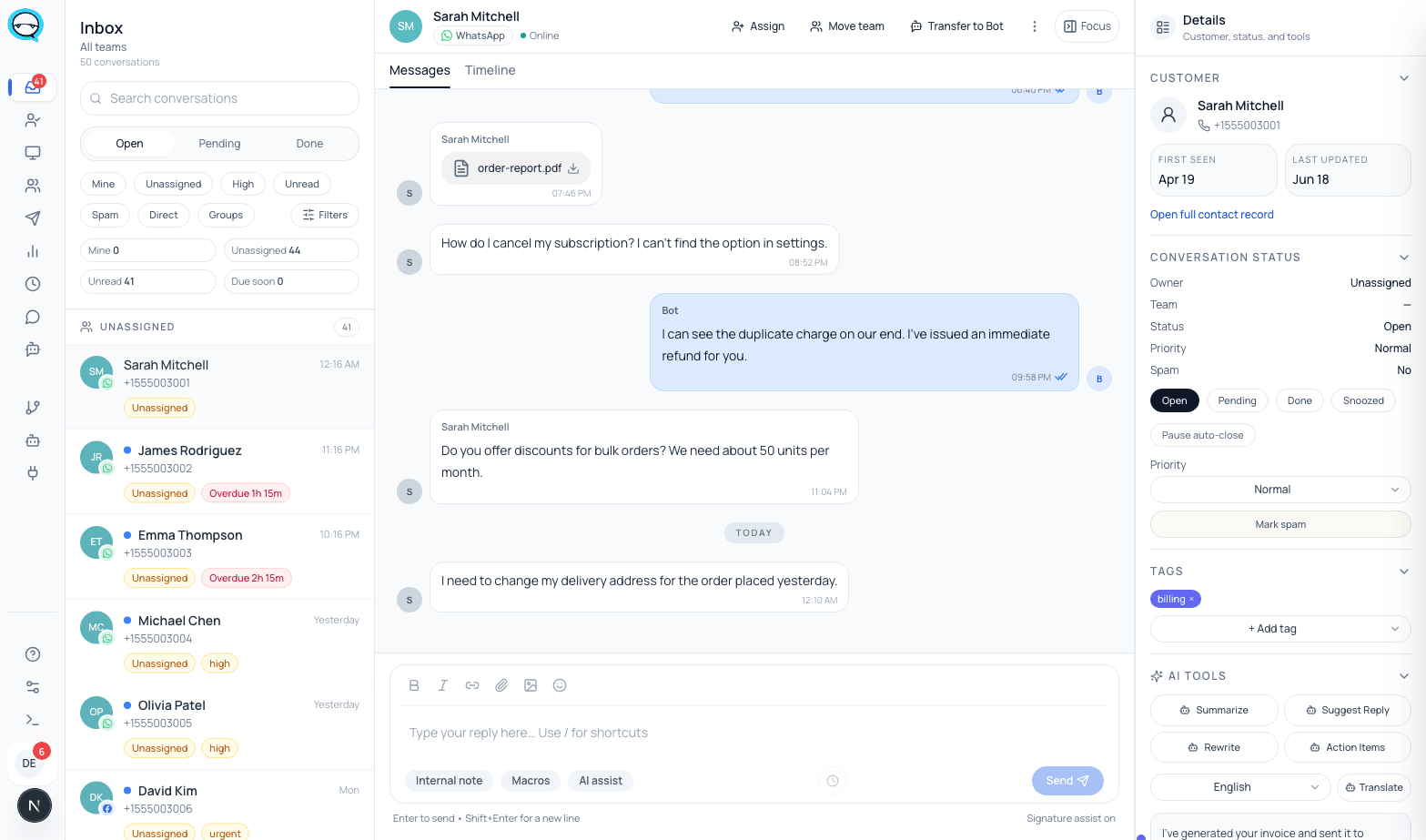
The message lands on the connected number and opens a conversation in the shared inbox with a status of open, an unread count and the contact attached. WhatsApp and Messenger both land in the same queue.
The conversation is visible to the team, and nobody has claimed it yet.
- 02
It gets a team and an owner
Automation flows can route a new conversation to a team based on what it is about, or an agent claims it. Either way the conversation carries one team and one assigned owner from that point on.
The queue shows a name next to the conversation, and it drops out of the unassigned list.
- 03
The team collaborates without the customer seeing it
Internal notes live inside the conversation. Tags, priority and status are set on the same record, so context stays attached to the thread rather than living in a side channel.
The next person to open the conversation reads the same context, and the customer sees only the replies.
- 04
It is handed off with the thread attached
Reassigning moves ownership to another agent or another team. The conversation, its notes and its history move with it, because they were never separate from it.
The new owner starts from what was already said instead of asking the customer to repeat it.
- 05
A clock runs while it waits
An SLA policy sets a first response target, a next response target and a resolution target, optionally scoped to a team and to business hours, with escalation configured on the policy.
Waiting work is measured rather than remembered.
- 06
A manager watches the queue, not the chats
The queue monitor shows open load, conversations with no owner, and what is running past its target, so a supervisor can move work before a customer notices.
Problems surface as a number on a board rather than as a complaint.
The same workflow, in the running product
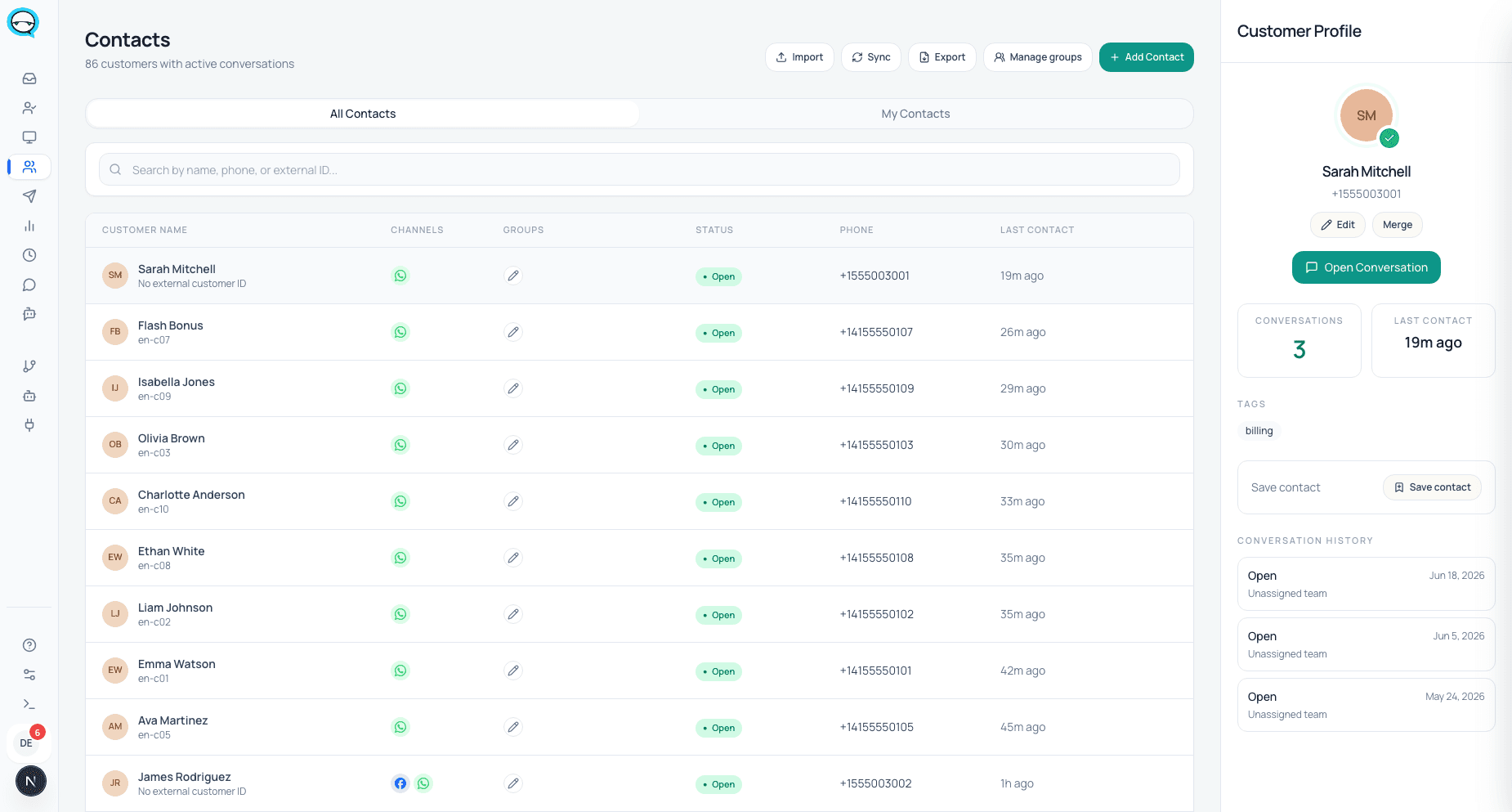
Real captures from a live marv.Inbox workspace.
Teams, roles and who can see what
Every conversation belongs to a team, and teams are how work is divided between sales, support and operations on the same number. Routing sends new conversations to a team; escalation moves them between teams without losing the thread.
Access is role based rather than device based. People sign in with their own accounts, roles decide what they can see and do, and removing somebody is an account change rather than unlinking a phone from a linked devices list. What they wrote stays in the conversation history and their open conversations are reassigned.
The contact record holds the customer side: details, status and the conversation history that the whole team reads. That record is what makes a handoff cheap, because the receiving agent is not starting from an empty screen.
What it takes to set up
You need a WhatsApp business number and a Meta business account. If you want to keep using the WhatsApp Business app on that number, the Coexistence route connects both to the same number, and it requires WhatsApp Business app version 2.24.17 or higher.
On the Coexistence route Meta syncs chat messages from the most recent six months and contacts with a WhatsApp number, and group chat messages are not included. Anything older stays on the phone, so plan the switch for a moment when losing older thread context is acceptable.
Messages your team sends from the WhatsApp Business app stay free. Messages sent through the Cloud API are billed at Cloud API pricing, so budget the outbound side before you route it through the platform.
Honest limits
Things we would rather you know before you buy than discover in week two.
- ▲WhatsApp and Messenger are live channels. Instagram and Telegram are coming soon.
- ▲Integrations are switched on per workspace by our team and are off by default, so a connector is not something you enable yourself during a trial.
- ▲A number used with both the WhatsApp Business app and the Cloud API has a fixed throughput of twenty messages per second, which is a real ceiling for bulk sending.
- ▲Coexistence syncs six months of chat history and no group chat messages. It is not a full archive migration.
- ▲The inbox interface ships in English and Hebrew. There is no Arabic interface locale yet, even though the marketing site is published in Arabic.
- ▲If your team is one or two people who never touch the same customer, none of this pays for itself and the free app is the better answer.
Questions before buying
Do we have to give up the WhatsApp Business app?+
No. The Coexistence route keeps the app on the same number while the team inbox works alongside it, with messages mirrored between the two. A dedicated Cloud API number is the alternative when you want nothing bypassing the workflow.
Can two agents reply to the same customer at once?+
They can, but the conversation carries one assigned owner and the queue shows who that is, which is the mechanism that stops it. The app on its own has no owner field, so it has no mechanism.
What does the customer see?+
The replies, from your business number. Assignment, internal notes, tags, priority and SLA timers are internal. WhatsApp states the same about its own multi-agent feature: customers cannot see which agent or device sent a message.
What happens when an agent leaves?+
You deactivate their account. Their conversations are reassigned, and everything they wrote stays in the thread and in the contact history.
Is this only for support teams?+
No. The same queue, ownership and SLA model is used for inbound sales. The difference is which team a conversation routes to and what the follow-up looks like, not the mechanics.
Sources, checked June 2026
Sources
External claims on this page about WhatsApp device limits, Coexistence sync and throughput come from Meta and WhatsApp official documentation. Product claims come from the running product.
- WhatsApp Help Center: About linked devices on the WhatsApp Business app
- WhatsApp Help Center: About multi-agent
- Meta for Developers: Onboard WhatsApp Business app users (Coexistence)
Checked on 2026-08-03
Who wrote this
marv.Inbox team
Product and support team, marv.Inbox
We build marv.Inbox and we run our own customer conversations inside it, on the same WhatsApp number the buttons on this page open.
See whether this workflow fits your team
Explore the product, then request a walkthrough if you want help mapping channels, ownership, automation, or rollout.