




 Boss CRM
 HubSpot
 Salesforce
 Pipedrive
 Zoho CRM
 monday.com




01
Connect your own channels
Businesses connect their official WhatsApp Business account and other messaging channels to their workspace. marv.Inbox never owns, initiates, or represents itself as your messaging accounts.
Every WhatsApp and Messenger conversation with one owner and one clock.
Your message lands in the same marv.Inbox workspace we run marv.Inbox from, so our bot, AI, and team answer you right here.
One shared inbox, every teammate sees the same incoming customer messages
Assign, comment, tag, and hand off conversations with the full thread attached
Built for teams of 2 to 50 people handling support, sales, and operations together

Sound familiar?
marv.Inbox is a team-collaboration tool. Businesses connect their own WhatsApp Business account and other messaging channels, and teammates work together to reply to incoming customer messages, the conversations customers start with the business. marv.Inbox does not send unsolicited messages and operates in compliance with Meta's messaging policies.
Click through the product at your own pace. No sales call required.
In the product
Queue + SLA
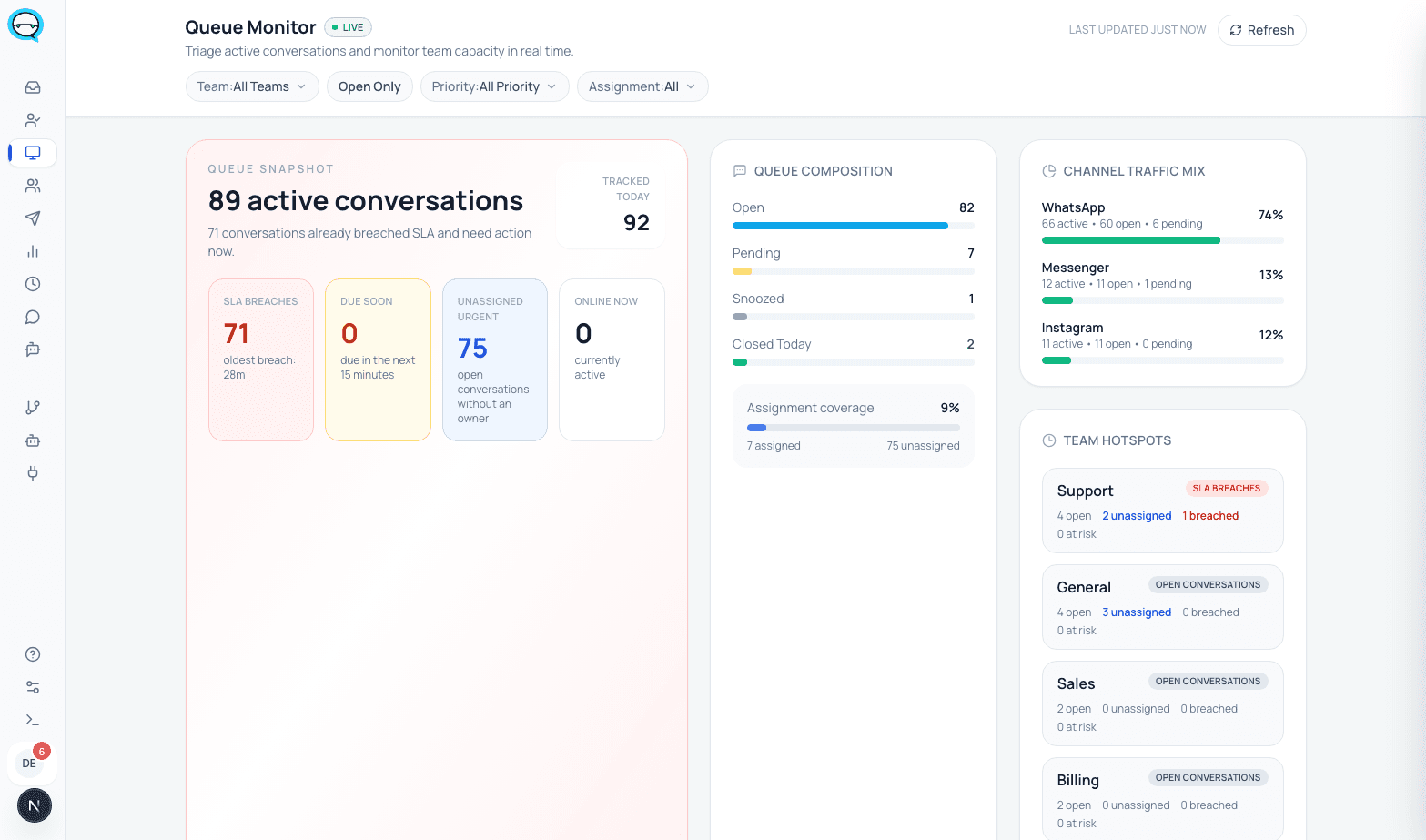
Live queue health and SLA breaches across every team, at a glance.
marv.Inbox combines front-line handling, agent-assist tools, opt-in follow-ups, and operational visibility in one workspace.
Shared inbox
Handle WhatsApp and other messaging channels in one queue with assignment, notes, thread context, and clean handoff between teammates.
Queue and SLA control
Track ownership, overdue conversations, team workload, and response pressure before service slips.
Agent assist and workflow tools
Suggest replies, surface knowledge, and route conversations so agents respond faster, with human review and handoff at every step.
Conversations, contacts, and reporting
Respond to customer-initiated chats, run opt-in follow-ups, manage contact records, and measure team performance without switching systems.
Integrations
marv.Inbox connects to the CRM, store, and calendar your team already runs, so a conversation updates the record without anyone retyping it.
Chat with customers on the world's most popular messaging app
Messenger
Handle Facebook page messages in one shared team inbox
Manage DMs and story replies from your business profile
Telegram
SoonReach customers on one of the fastest-growing messaging platforms
CRM
Look up a contact, push a qualified lead, and keep the right record in sync without leaving the conversation.
WooCommerce
Pull order details into conversations and notify customers on order events
Shopify
Connect your store so order events can message the customer automatically
Google Calendar
Book, reschedule, and cancel appointments from a conversation
Calendly
Offer real availability and confirm the booking in chat
Google Drive
Use your own documents as the knowledge the assistant answers from
Notion
Sync conversation data and notes into your Notion pages
Developer API and webhooks
Build your own automation on top of your workspace
Integrations are switched on per workspace by our team, according to your plan. Ask us and we set up the first connection with you.
Your customer conversations are sensitive. marv.Inbox protects them with encryption, strict access control, and isolation between businesses, on official and compliant infrastructure.
Traffic is served over HTTPS and connections use TLS, and sensitive credentials and tokens are encrypted at rest.
Each business works in its own isolated workspace and data store, so one company can never see another company's conversations.
Every agent gets their own seat with defined permissions. Admins, team leads, agents, and viewers each see only what they should.
marv.Inbox runs on the official WhatsApp Business API with verified webhooks, and offers a Privacy Policy, a DPA, and data deletion on request.
Start free for 10 days, then take the early adopter offer: two months at half price on either paid plan.
Each plan is designed for a different stage of business growth
Free Trial
Entrepreneurs, online stores, and small businesses testing WhatsApp before committing
Starter
Businesses with 3-5 support agents managing WhatsApp and Messenger (Instagram and Telegram coming soon)
Growth
Businesses with 6-15 agents wanting workflow tools, SLA policies, and advanced reports, with agent assist in the inbox
Enterprise
Large companies with 20+ agents, compliance needs, custom integrations, and white-label
Answer one question, and you'll know exactly where to go
Want to try without committing?
Limited marv.Inbox access for 10 days, no credit card required
Small team (3-5 agents) managing WhatsApp and social channels?
Team management, WhatsApp + Messenger, unlimited conversations & up to 500 opt-in conversations / month
Need workflow tools, SLA policies & dashboards?
15 agents, workflow tools, agent assist & up to 2,000 opt-in conversations / month
20+ agents, compliance requirements, custom integrations, or white-label?
Fully custom solution, unlimited seats, guaranteed SLA, audit logs & dedicated CSM
Businesses connect their official WhatsApp Business account and other messaging channels to their workspace. marv.Inbox never owns, initiates, or represents itself as your messaging accounts.
Customer messages arrive in a shared inbox where your team responds from one workspace. Agent-assist tools suggest replies and surface knowledge, humans stay in control. Outreach is limited to customer-initiated chats and opt-in follow-ups, in line with Meta's Business Messaging Policy.
Managers monitor SLA pressure, ownership, queue health, and outcomes without leaving the product.
No. marv.Inbox is WhatsApp-first. Messenger is also live. Instagram and Telegram are coming soon.
Yes. AI is part of the workspace through profiles, prompts, knowledge, and assistive workflows, so teams can add AI without replacing the operational layer.
Yes. Bot flows, routing rules, AI settings, handoff paths, and scheduled jobs are already part of the product.
You do, and that is the point. You connect your own official WhatsApp Business account through Coexistence, so your number, your account, and your customer history stay yours. Meta bills you directly at its own rates, and marv.Inbox never sits between you and Meta or adds a markup on your messages, so you are never locked into us. Would you rather not handle Meta's billing yourself? We can host the number and take care of the Meta bill for you instead, just ask.
How Coexistence keeps your numberYes, for opt-in conversations and customer follow-ups only. Businesses communicate with users who have initiated contact or explicitly opted in. marv.Inbox does not send unsolicited messages and operates in compliance with Meta's Business Messaging Policy.
New workspaces are currently onboarded by invitation. The right next step is to start the interactive demo or request a walkthrough.
Talk to our team, we'll walk you through the right setup.
Tell us about your team, message volume, and channels. We'll help you evaluate fit and show what setup would look like.
Hands-on product walkthrough
Fit check for your channels and workflow
Invite-only onboarding for new workspaces
We use analytics cookies to understand how visitors use the site. Accept all also allows advertising cookies, which only measure whether an ad brought you here. Privacy Policy.