
WhatsApp customer support, run as an operation
Support stops being a phone somebody watches and starts being an operation the moment three questions have answers: who owns this, what have we already said, and how long has this person been waiting. This page shows how each of those is answered in marv.Inbox, and what it takes to set up.
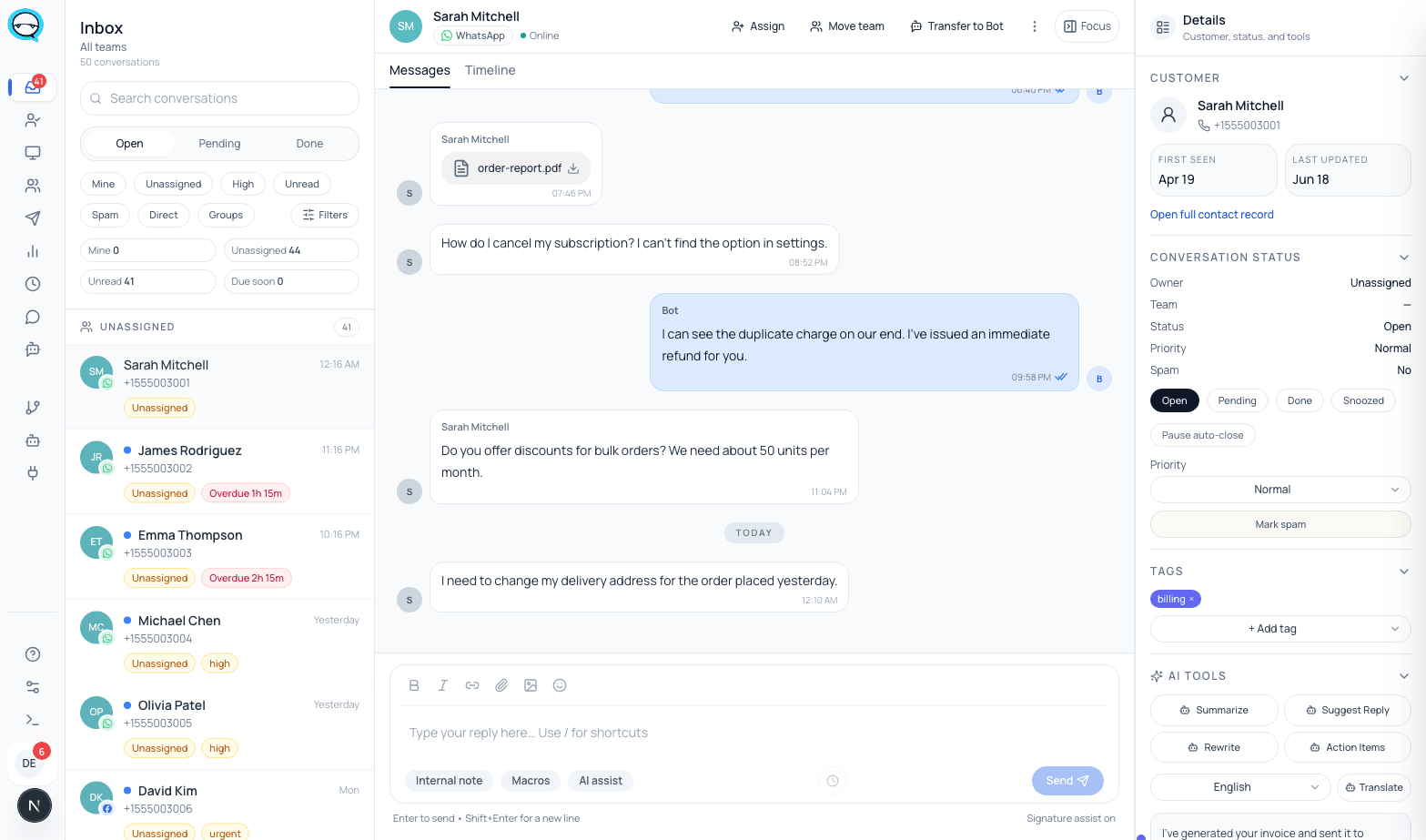
- One owner and one team per conversation, with status, priority and tags on the same record
- SLA policies with first response, next response and resolution deadlines, and breach tracking per conversation
- Internal notes with mentions, invisible to the customer
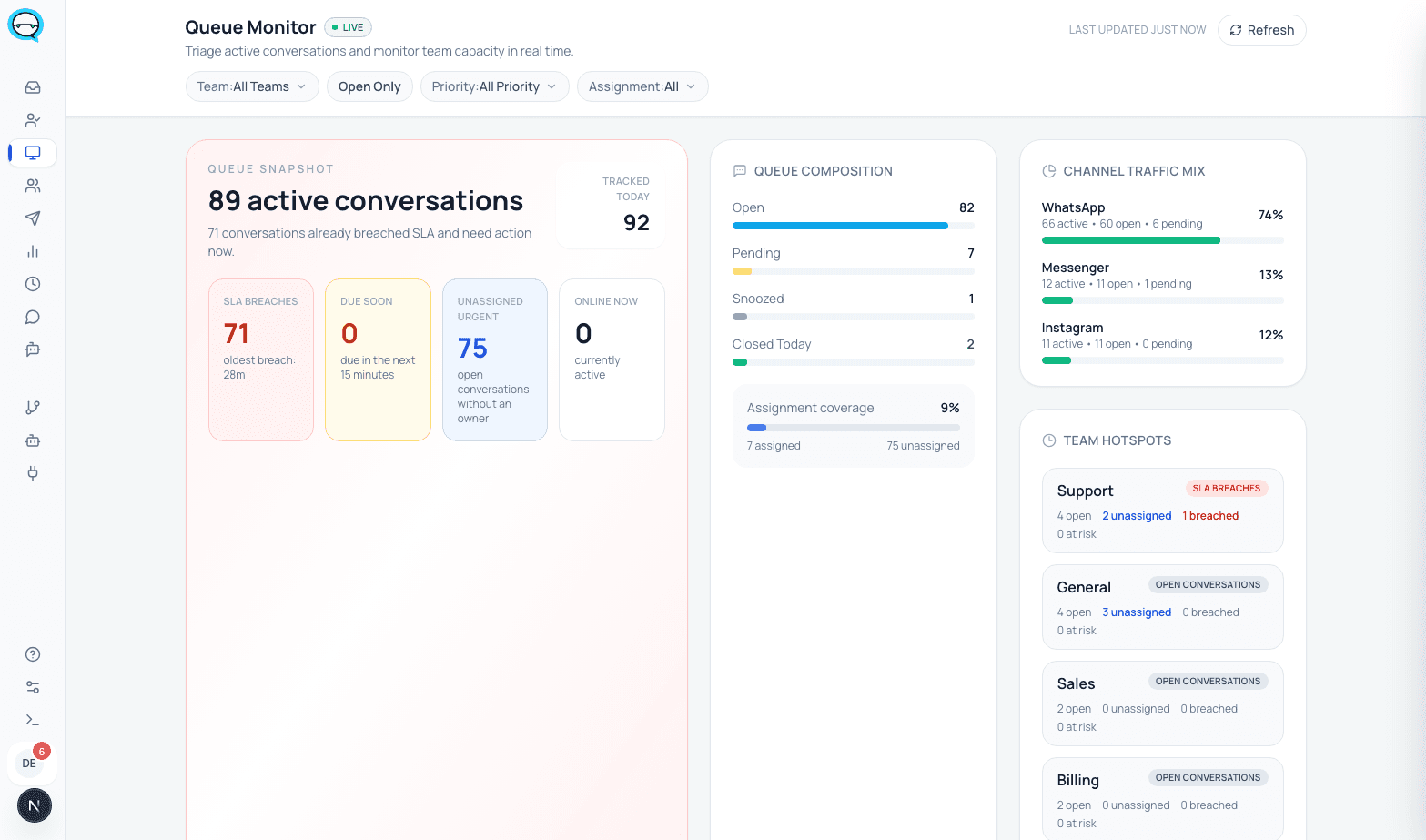
- A live queue showing open load, unassigned work and what is past its deadline
Short answer
A WhatsApp support tool is the software layer that turns a shared number into a queue with accountability. Each conversation gets an owner, a team, a status and a clock, the team collaborates on it without the customer seeing, and a manager watches the queue rather than reading every chat.
If your volume is low enough that nothing ever waits, the WhatsApp Business app is genuinely enough and this page is not for you.
The operation, end to end
Six stages, each one backed by a field or a screen in the product rather than by a diagram.
- 01
Intake
A customer message opens a conversation with a status of open, an unread count and the contact attached. WhatsApp and Messenger land in the same queue, so there is one place to look.
Nothing arrives in a personal phone that only one person can see.
- 02
Routing and ownership
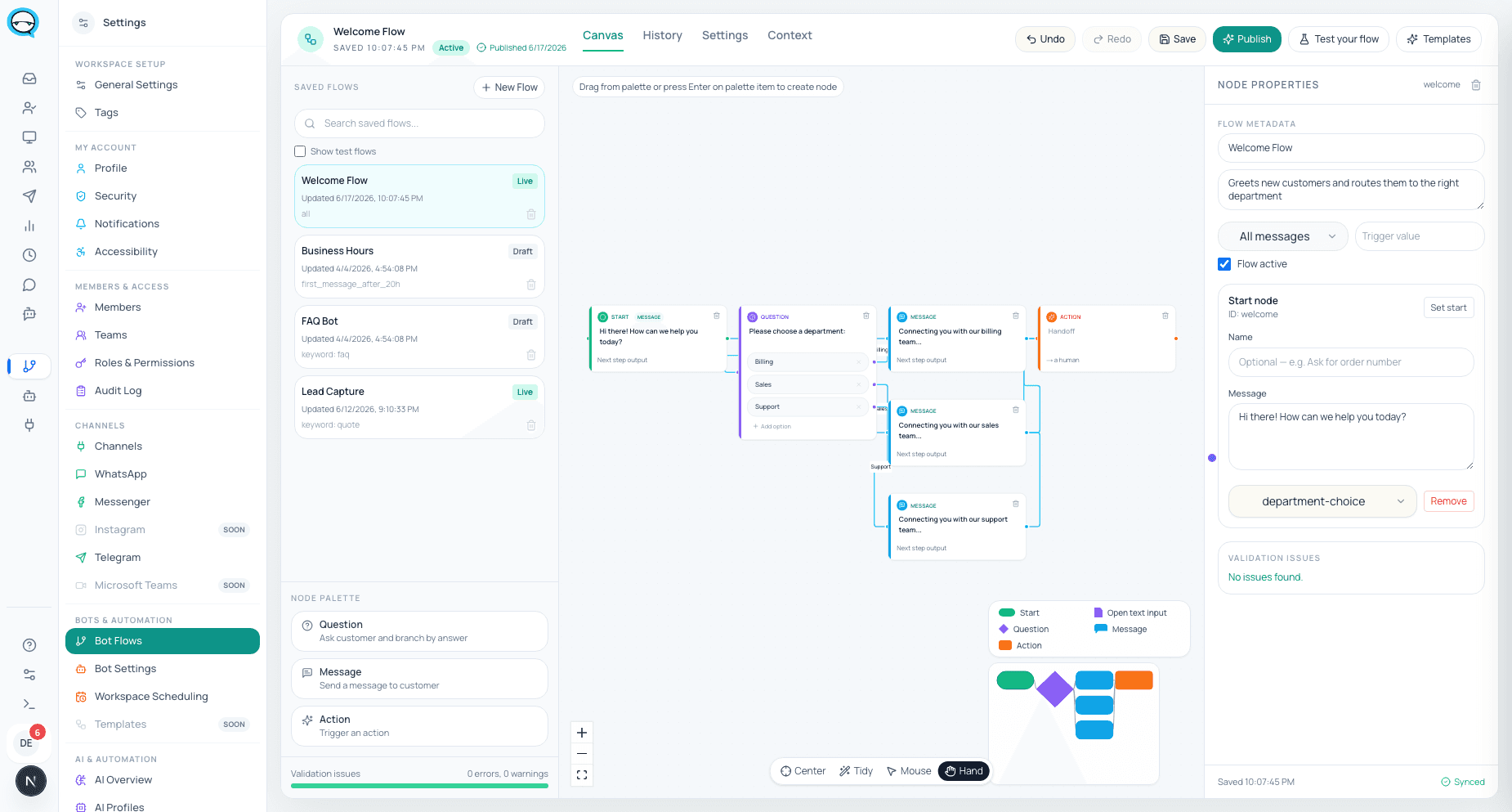
Automation flows route a new conversation to a team based on what it is about, or an agent claims it. From then on the conversation carries one team and one assigned owner.
The unassigned list is a real list, and a short one, rather than an assumption.
- 03
The SLA clock starts
An SLA policy sets three targets: first response, next response and resolution. It can be scoped to a team and to business hours, and carries its own escalation configuration. Each conversation gets a tracker holding those three deadlines.
Waiting work is measured. Each deadline is tracked individually rather than as one blunt timer.
- 04
The team works it without the customer seeing
Internal notes live inside the conversation and can mention a specific colleague. Saved replies cover the answers you give constantly. Tags, priority and status stay on the same record as the thread.
Context stays attached to the conversation rather than living in a side channel nobody searches later.
- 05
Escalation
Reassigning moves the conversation to another agent or another team, with its notes and history attached. Escalation rules live on the SLA policy, so it is a configured behavior rather than someone remembering to shout.
The receiving team starts from what was already said, and the customer is not asked to repeat themselves.
- 06
The manager view
The queue monitor shows open load, conversations with no owner, and what has passed a deadline. Breaches are recorded per conversation, per deadline type.
A supervisor moves work before a customer complains, and can answer for the day afterwards with something other than an impression.
The same operation, in the running product
Real captures from a live marv.Inbox workspace.
What an agent sees, and what a manager sees
The two jobs need different screens. Giving an agent the manager view is how you get people watching dashboards instead of answering customers.
| Agent | Manager | |
|---|---|---|
| Primary screen | The conversations assigned to them | The queue as a whole |
| What they act on | The next message that needs an answer | Load, unassigned work, and deadlines at risk |
| Collaboration | Internal notes and mentions inside the thread | Reassignment between agents and teams |
| Time pressure | The deadline on the conversation in front of them | Which deadlines are being missed and where |
| Access | Scoped by their role | Scoped by their role, with the queue view added |
What it takes to set up
Connect the number first. If you want to keep the WhatsApp Business app on it, that is the Coexistence path; if you want nothing bypassing the workflow, use a dedicated Cloud API number.
Then create the teams before the agents. Routing sends conversations to teams, so a workspace with one team routes everything to one place and the queue view tells you nothing useful.
Write one SLA policy and set business hours on it. A policy without business hours will happily count the weekend against you.
Add the saved replies you already send constantly, and the two or three templates you will need to reopen a conversation once the 24 hour window has closed.
Honest limits
What this does not do, said before you buy rather than after.
- ▲We do not publish a response-time improvement figure, because we have no measured before-and-after we are willing to stand behind. Anyone quoting you one for their own product should be asked how it was measured.
- ▲WhatsApp and Messenger are live channels. Instagram and Telegram are coming soon.
- ▲Integrations are switched on per workspace by our team and are off by default. A connector is not something you enable yourself mid-trial.
- ▲Outside the 24 hour customer service window you can only send approved templates, so reopening a cold conversation is a process, not a message.
- ▲On a Coexistence number the app stays live, so an agent can still answer from the phone and bypass assignment and SLA entirely. That is the trade you accepted by keeping the app.
- ▲From 1 October 2026 Meta charges for service messages and for utility messages sent in response to users, so the replies that make up most of a support team’s volume stop being free.
- ▲The inbox interface ships in English and Hebrew. There is no Arabic interface locale yet.
Questions from support leads
Can I see who is falling behind?+
Yes. Each conversation has a tracker with first response, next response and resolution deadlines and a breach flag for each, and the queue monitor shows what is past its deadline right now.
Do internal notes ever reach the customer?+
No. Notes live inside the conversation record and are internal, including mentions of colleagues.
What happens out of hours?+
An SLA policy can carry business hours, so the clock respects them rather than counting a Saturday night against your first response target.
Can two teams work the same number?+
Yes. Conversations carry a team, routing sends them to the right one, and escalation moves them between teams with the full thread attached.
What happens when an agent leaves?+
Deactivate their account. Their open conversations are reassigned, and everything they wrote stays in the thread and the contact history.
Sources, checked June 2026
Sources
Product behavior on this page is described from the shipped product. The external claims, about the messaging window, Coexistence and the dated pricing change, come from Meta.
- Meta for Developers: Pricing on the WhatsApp Business Platform
- Meta for Developers: Upcoming pricing updates for non-template messages
- Meta for Developers: Onboard WhatsApp Business app users (Coexistence)
Checked on 2026-08-03
Who wrote this
marv.Inbox team
Product and support team, marv.Inbox
We build marv.Inbox and we run our own customer conversations inside it, on the same WhatsApp number the buttons on this page open.
See whether this workflow fits your team
Explore the product, then request a walkthrough if you want help mapping channels, ownership, automation, or rollout.