
Can multiple users use WhatsApp Business?
Yes, more than one person can work from the same WhatsApp Business number. There are four different ways to do it, and they are not interchangeable. This page walks through each one with the limits Meta publishes, so you can pick the route that matches your team instead of the route a vendor sells.
- Four routes compared: the app alone, a Meta subscription, Coexistence, and the Cloud API
- Official device limits, sync behavior and what breaks when a subscription lapses
- What happens to the phone, the number, the history and a leaving employee in each route
- The cases where the free WhatsApp Business app is genuinely enough
Short answer
Yes. The WhatsApp Business app lets you use up to four linked devices and one phone at a time. A Meta Verified or Meta One subscription raises that to ten devices and adds chat assignment between agents. Beyond that you move the number onto the WhatsApp Cloud API, either alongside the app through Coexistence or on its own, and the number of people who can work is limited by your inbox software rather than by WhatsApp.
Which of those four is right depends on one question: do you only need more people typing, or do you need to know who owns each conversation and what happened before?
The four routes, and what each one actually gives you
Route one is the WhatsApp Business app on its own. You install it on one phone and link up to four other devices, such as WhatsApp Web or a desktop. Everyone sees every chat, anyone can reply to anything, and there is no record of who took which conversation. It costs nothing.
Route two adds a Meta Verified or Meta One subscription, which unlocks the feature WhatsApp calls multi-agent. You can link up to ten devices, name each linked device after the agent using it, assign chats to a specific agent, and open a message to see which agent and which device sent it. Customers never see the assignment or the agent name. Meta notes that the premium version of this feature may not be available in every account yet.
Route three is Coexistence. The number stays on the WhatsApp Business app and is also connected to the Cloud API, so a team inbox and the app work on the same number at the same time. Messages are mirrored between the two, which is what makes this the usual path for a business that does not want to stop using the app it already runs.
Route four is a dedicated Cloud API number with no app on it. Everything happens in the inbox software: routing, ownership, history, reporting. This is the route for a team that runs support or sales as an operation rather than as a phone somebody answers.
Choosing a route
Team size matters less than whether you need accountability. Three people who each handle their own customers can share an app. Three people covering the same queue cannot, because the second one to open a chat has no way to know the first one already replied.
| Situation | Route | Why |
|---|---|---|
| One person, one phone | WhatsApp Business app | Nothing to coordinate. Adding software adds cost and no answer. |
| Two to four people, each with their own customers | WhatsApp Business app with linked devices | Four linked devices and one phone is enough, and overlap is rare. |
| Up to ten people who need chats split between them | Meta Verified or Meta One subscription | Ten devices, named devices, and chat assignment inside the app itself. |
| A team that shares one queue and needs history, notes and reporting | Coexistence with a team inbox | Keeps the app and the number, adds ownership and a record of what happened. |
| Support or sales run as an operation, with routing and SLA | Dedicated Cloud API number | No app on the number, so nothing bypasses the workflow. |
Device counts are the limits WhatsApp publishes for the Business app. Cloud API routes are limited by your inbox software, not by a device count.
What happens to the phone, the number, the history and access
The phone stays the anchor in the app routes. Linked devices work while your phone is offline, but they log out if the phone goes unused for more than fourteen days, and WhatsApp disconnects linked devices automatically after thirty days of inactivity. Registering the account and linking a new device still needs the primary phone.
Calls behave differently once you pass four devices. An account with no more than four linked devices receives calls on all of them. An account with more than four receives calls only on the primary device.
Some things do not work on linked devices at all: tablets, viewing live location, creating or viewing broadcast lists, and adding status from a linked companion phone.
On the Coexistence route the history moves with you, but only partly. Meta syncs chat messages from the most recent six months and contacts that have a WhatsApp number. Group chat messages are not included. Media messages arrive without media asset ids, and those ids follow separately only for media sent within fourteen days of onboarding.
Offboarding is where the routes diverge most. In the app routes, a leaving employee had a linked device, and you remove it from the linked devices list on the primary phone. Everything they said stays in the same shared chat thread with no separate record. On a Cloud API route the person had an account in the inbox, you deactivate it, and the conversations they owned are reassigned while the full thread and any internal notes stay where they are.
What Coexistence costs and what it constrains
The WhatsApp Business app must be on version 2.24.17 or higher before the number can be onboarded this way.
Messages your team sends from the WhatsApp Business app stay free. Messages sent through the Cloud API are billed at Cloud API pricing, so the same number can produce a bill on one path and not on the other. Plan for that before you route outbound work through the API.
A number in use with both the app and the Cloud API has a fixed throughput of twenty messages per second. That is generous for a support team and a real ceiling for a bulk-messaging operation.
When the free app is enough, and you should stop here
This is the part most vendor pages leave out. There are common situations where adding a team inbox buys you nothing.
- ▲You are one person, or two people who never touch the same customer.
- ▲Your volume is low enough that nothing waits, and you would never look at a queue report.
- ▲Your team already fits inside four linked devices and nobody has ever double-replied.
- ▲You need up to ten agents and chat assignment, and a Meta Verified or Meta One subscription gets you there without new software.
- ▲You are not ready to be billed per conversation on the Cloud API for outbound work.
Where a team inbox starts to earn its place
The app routes give more people access to the same chats. What they do not give is an answer to "who is handling this", "what did we already tell them", and "how long has this person been waiting". Those three questions are the whole reason team inboxes exist.
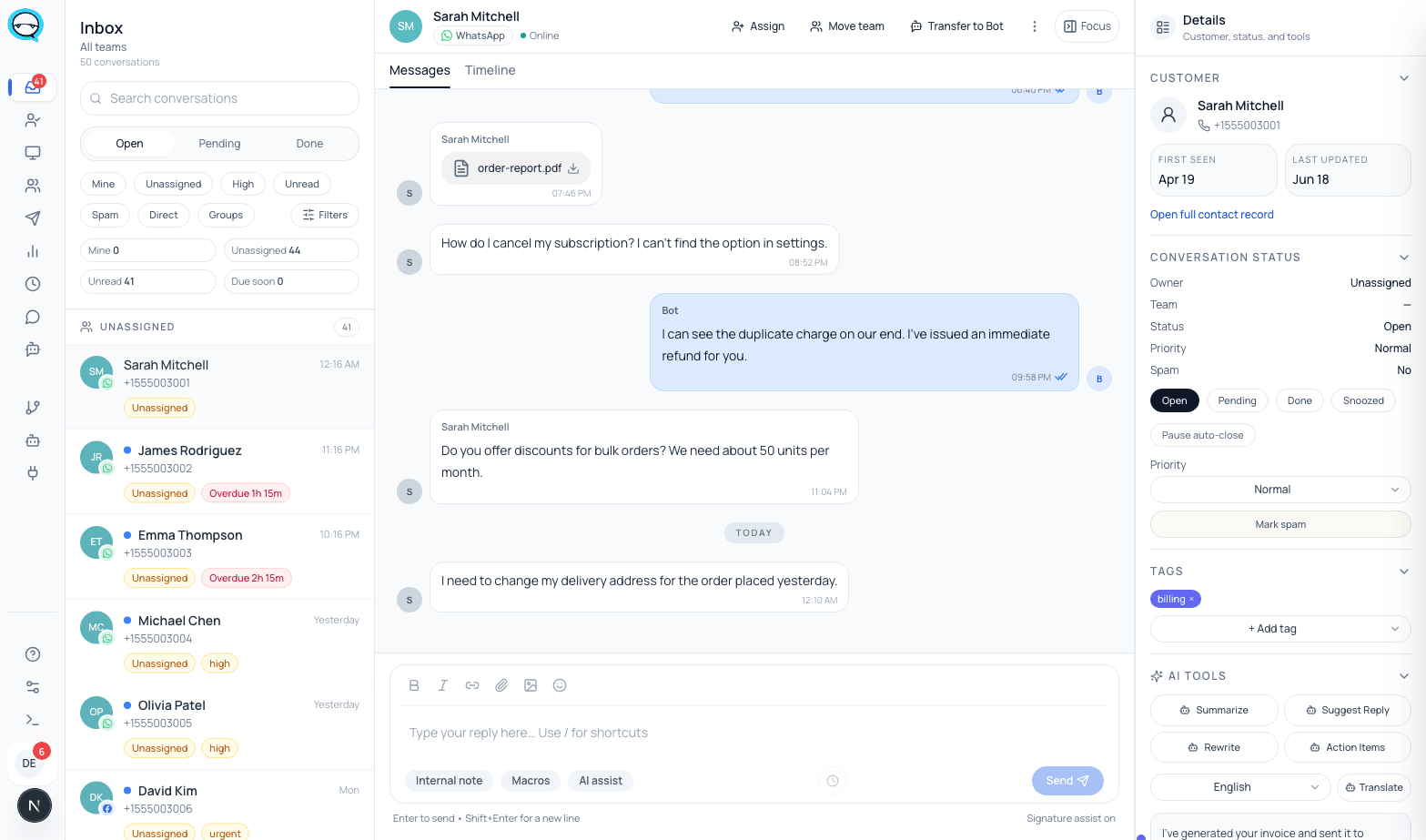
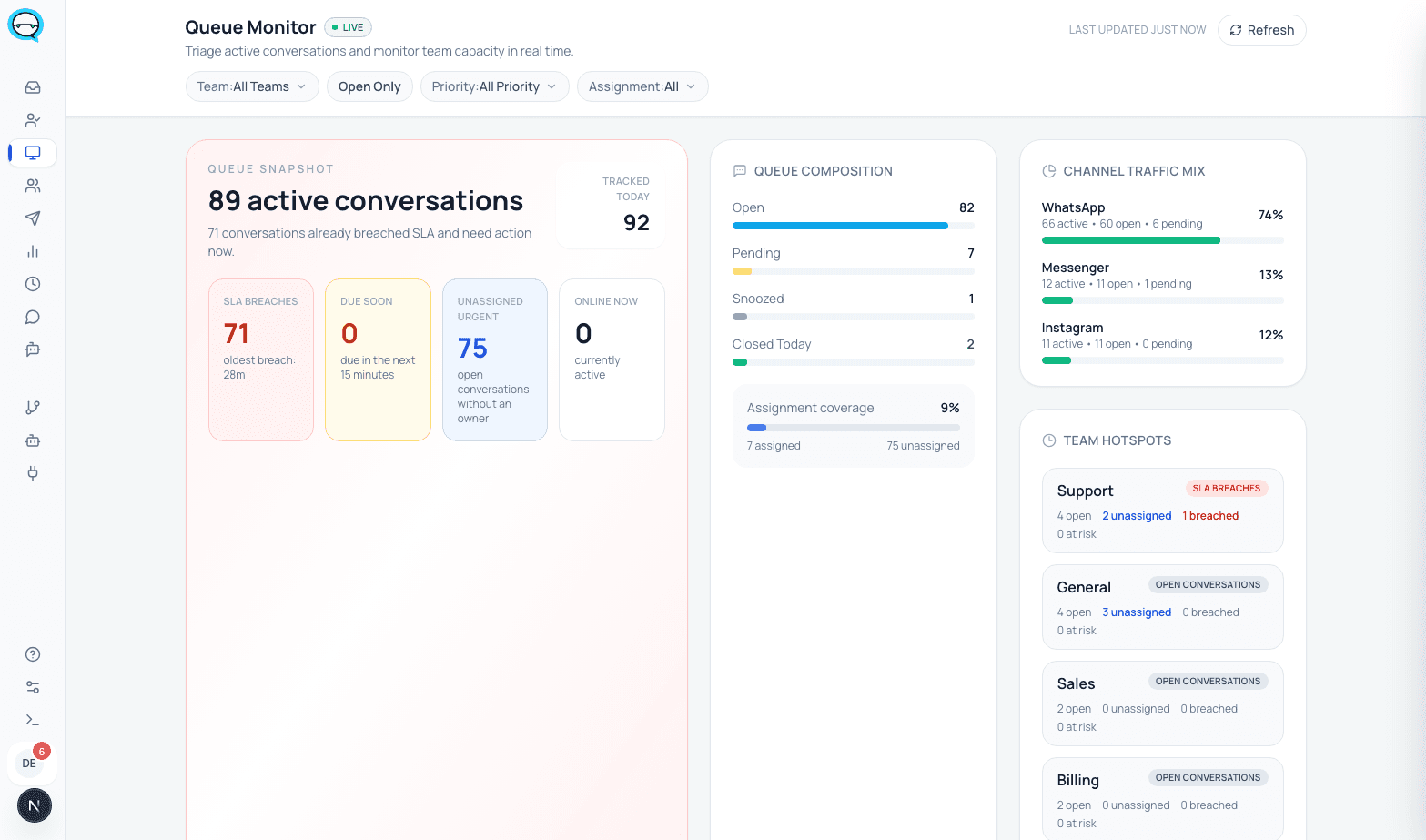
In marv.Inbox each conversation carries one assigned owner and one team, a status, a priority and tags. Internal notes live inside the conversation and are never sent to the customer. An SLA policy puts a clock on waiting work, and the queue monitor shows a manager open load, unassigned conversations and what is running late. The contact record holds the history, so whoever picks the conversation up next reads the same thread the last person left.
Access is role based rather than device based, so removing somebody is an account change rather than unlinking a phone. WhatsApp and Messenger are live channels today. Instagram and Telegram are coming soon.
What that looks like in the product
Real captures from a running marv.Inbox workspace.
Questions we actually get asked
Can two people use the same WhatsApp Business account at the same time?+
Yes. The app supports one phone and up to four linked devices at once, so several people can be in the same account simultaneously. What the app does not do without a subscription is tell them apart or split the work between them.
Do I lose my chat history if I connect the number to a team inbox?+
On the Coexistence route Meta syncs chat messages from the most recent six months and contacts that have a WhatsApp number. Group chat messages are not included. Anything older than six months stays on the phone.
What happens if I cancel my Meta Verified or Meta One subscription?+
WhatsApp states that if you cancel or your subscription benefits change, only your four most recently active devices remain linked. If you had ten agents on devices, six of them lose access.
Do customers see which agent replied?+
No. WhatsApp states that customers cannot see which agent or which device a message was sent from, and cannot see who a chat was assigned to. The same is true in a team inbox: assignment and internal notes are internal.
Can I keep using the WhatsApp Business app after connecting to a team inbox?+
On the Coexistence route yes, that is the point of it. Messages are mirrored between the app and the Cloud API. On a dedicated Cloud API number there is no app on that number.
Sources, checked June 2026
Sources
Every device count, sync rule and subscription behavior above comes from these official pages. They change without notice, so the checked date matters as much as the link.
- WhatsApp Help Center: About linked devices on the WhatsApp Business app
- WhatsApp Help Center: About multi-agent
- Meta for Developers: Onboard WhatsApp Business app users (Coexistence)
Checked on 2026-08-03
Who wrote this
marv.Inbox team
Product and support team, marv.Inbox
We build marv.Inbox and we run our own customer conversations inside it, on the same WhatsApp number the buttons on this page open.
See this working on your own use case
Explore the live demo, then book a short walkthrough and we will map your queues, owners, and handoffs together.